Apache Flink 零基础入门(四):客户端操作的 5 种模式
1.环境说明
在前面几期的课程里面讲过了Flink开发环境的搭建和应用的部署以及运行,今天的课程主要是讲Flink的客户端操作。本次讲解以实际操作为主。这次课程是基于社区的版本,操作系统是Mac系统,浏览器是GoogleChrome浏览器。有关开发环境的准备和集群的部署,请参考「开发环境搭建和应用的配置、部署及运行」的内容。
2.课程概要如下图所示,Flink提供了丰富的客户端操作来提交任务和与任务进行交互,包括Flink命令行,ScalaShell,SQLClient,RestfulAPI和Web。Flink首先提供的最重要的是命令行,其次是SQLClient用于提交SQL任务的运行,还有就是ScalaShell提交TableAPI的任务。同时,Flink也提供了Restful服务,用户可以通过http方式进行调用。此外,还有Web的方式可以提交任务。
在Flink安装目录的bin目录下面可以看到有flink,和等文件,这些都是客户端操作的入口。
3.1Flink命令行
Flink的命令行参数很多,输入flink-h能看到完整的说明:
/flink-h
如果想看某一个命令的参数,比如Run命令,输入:
/flinkrun-h
本文主要讲解常见的一些操作,更详细的文档请参考:Flink命令行官方文档。
3.1.1Standalone
首先启动一个Standalone的集群:
/
Startingcluster.
打开。
Run
运行任务,以Flink自带的例子TopSpeedWindowing为例:
/flinkrun-dexamples/streaming/
Startingexecutionofprogram
ExecutingTopSpeedWindowingexamplewithdefaultinputdataset.
Use--inputtospecifyfileinput.
JobhasbeensubmittedwithJobID5e20cb6b0f357591171dfcca2eea09de
运行起来后默认是1个并发:
点左侧「TaskManager」,然后点「Stdout」能看到输出日志:
或者查看本地Log目录下的*.out文件:
List
查看任务列表:
/:8081
Waitingforresponse
------------------Running/RestartingJobs-------------------
24.03.201910:14:06:5e20cb6b0f357591171dfcca2eea09de:CarTopSpeedWindowingExample(RUNNING)
--------------------------------------------------------------
Noscheduledjobs.
Stop
停止任务。通过-m来指定要停止的JobManager的主机地址和端口。
/:8081d67420e52bd051fae2fddbaa79e046bb
Stoppingjobd67420e52bd051fae2fddbaa79e046bb.
------------------------------------------------------------
Theprogramfinishedwiththefollowingexception:
:Couldnotstopthejobd67420e52bd051fae2fddbaa79e046bb.
$stop$5(:554)
(:985)
(:547)
(:1062)
$main$11(:1126)
(NativeMethod)
(:422)
(:1836)
(:41)
(:1126)
Causedby:::[Jobtermination(STOP)failed:Thisjobisnotstoppable.]
(:357)
(:1915)
(:392)
$stop$5(:552)
9more
Causedby::[Jobtermination(STOP)failed:Thisjobisnotstoppable.]
(:380)
$submitRequest$3(:364)
(:952)
$(:926)
$(:442)
(:1149)
$(:624)
(:748)
从日志里面能看出Stop命令执行失败了。一个Job能够被Stop要求所有的Source都是可以Stoppable的,即实现了StoppableFunction接口。
/**
*需要能stoppable的函数必须实现这个接口,例如流式任务的source。
*stop()方法在任务收到STOP信号的时候调用。
*source在接收到这个信号后,必须停止发送新的数据且优雅的停止。
*/
@PublicEvolving
publicinterfaceStoppableFunction{
/**
*停止source。与cancel()不同的是,这是一个让source优雅停止的请求。
*等待中的数据可以继续发送出去,不需要立即停止。
*/
voidstop();
}
Cancel
取消任务。如果在conf/里面配置了,会保存Savepoint,否则不会保存Savepoint。
/:80815e20cb6b0f357591171dfcca2eea09de
Cancellingjob5e20cb6b0f357591171dfcca2eea09de.
Cancelledjob5e20cb6b0f357591171dfcca2eea09de.
也可以在停止的时候显示指定Savepoint目录。
/:8081-s/tmp/savepoint29da945b99dea6547c3fbafd57ed8759
Cancellingjob29da945b99dea6547c3fbafd57ed8759withsavepointto/tmp/savepoint.
:/tmp/savepoint/savepoint-29da94-88299bacafb7.
/tmp/savepoint/savepoint-29da94-88299bacafb7
total32K
-rw-r--r--1baoniu29KMar2410:33_metadata
取消和停止(流作业)的区别如下:
cancel()调用,立即调用作业算子的cancel()方法,以尽快取消它们。如果算子在接到cancel()调用后没有停止,Flink将开始定期中断算子线程的执行,直到所有算子停止为止。
stop()调用,是更优雅的停止正在运行流作业的方式。stop()仅适用于Source实现了StoppableFunction接口的作业。当用户请求停止作业时,作业的所有Source都将接收stop()方法调用。直到所有Source正常关闭时,作业才会正常结束。这种方式,使作业正常处理完所有作业。
Savepoint
触发Savepoint。
/:8081ec53edcfaeb96b2a5dadbfbe5ff62bbb/tmp/savepoint
Triggeringsavepointforjobec53edcfaeb96b2a5dadbfbe5ff62bbb.
Waitingforresponse
:file:/tmp/savepoint/savepoint-ec53ed-84b00ce500ee
Youcanresumeyourprogramfromthissavepointwiththeruncommand.
说明:Savepoint和Checkpoint的区别(详见文档):
Checkpoint是增量做的,每次的时间较短,数据量较小,只要在程序里面启用后会自动触发,用户无须感知;Checkpoint是作业failover的时候自动使用,不需要用户指定。
Savepoint是全量做的,每次的时间较长,数据量较大,需要用户主动去触发。Savepoint一般用于程序的版本更新(详见文档),Bug修复,A/BTest等场景,需要用户指定。
通过-s参数从指定的Savepoint启动:
/flinkrun-d-s/tmp/savepoint/savepoint-f049ff-24ec0d3e0dc7./examples/streaming/
Startingexecutionofprogram
ExecutingTopSpeedWindowingexamplewithdefaultinputdataset.
Use--inputtospecifyfileinput.
查看JobManager的日志,能够看到类似这样的Log:
2019-03-2810:30:53,957
-Startingjob790d7b98db6f6af55d04aec1d773852dfromsavepoint/tmp/savepoint/savepoint-f049ff-24ec0d3e0dc7()
2019-03-2810:30:53,959
-ResetthecheckpointIDofjob790d7b98db6f6af55d04aec1d773852dto2.
2019-03-2810:30:53,959
-Restoringjob790d7b98db6f6af55d04aec1d773852dfromlatestvalidcheckpoint:Checkpoint1@0for790d7b98db6f6af55d04aec1d773852d.
Modify
修改任务并行度。
为了方便演示,我们修改conf/将TaskSlot数从默认的1改为4,并配置Savepoint目录。(Modify参数后面接-s指定Savepoint路径当前版本可能有Bug,提示无法识别)
:4
:file:///tmp/savepoint
修改参数后需要重启集群生效,然后再启动任务:
//
Stoppingtaskexecutordaemon(pid:53139)
Stoppingstandalonesessiondaemon(pid:52723)
Startingcluster.
/flinkrun-dexamples/streaming/
Startingexecutionofprogram
ExecutingTopSpeedWindowingexamplewithdefaultinputdataset.
Use--inputtospecifyfileinput.
JobhasbeensubmittedwithJobID7752ea7b0e7303c780de9d86a5ded3fa
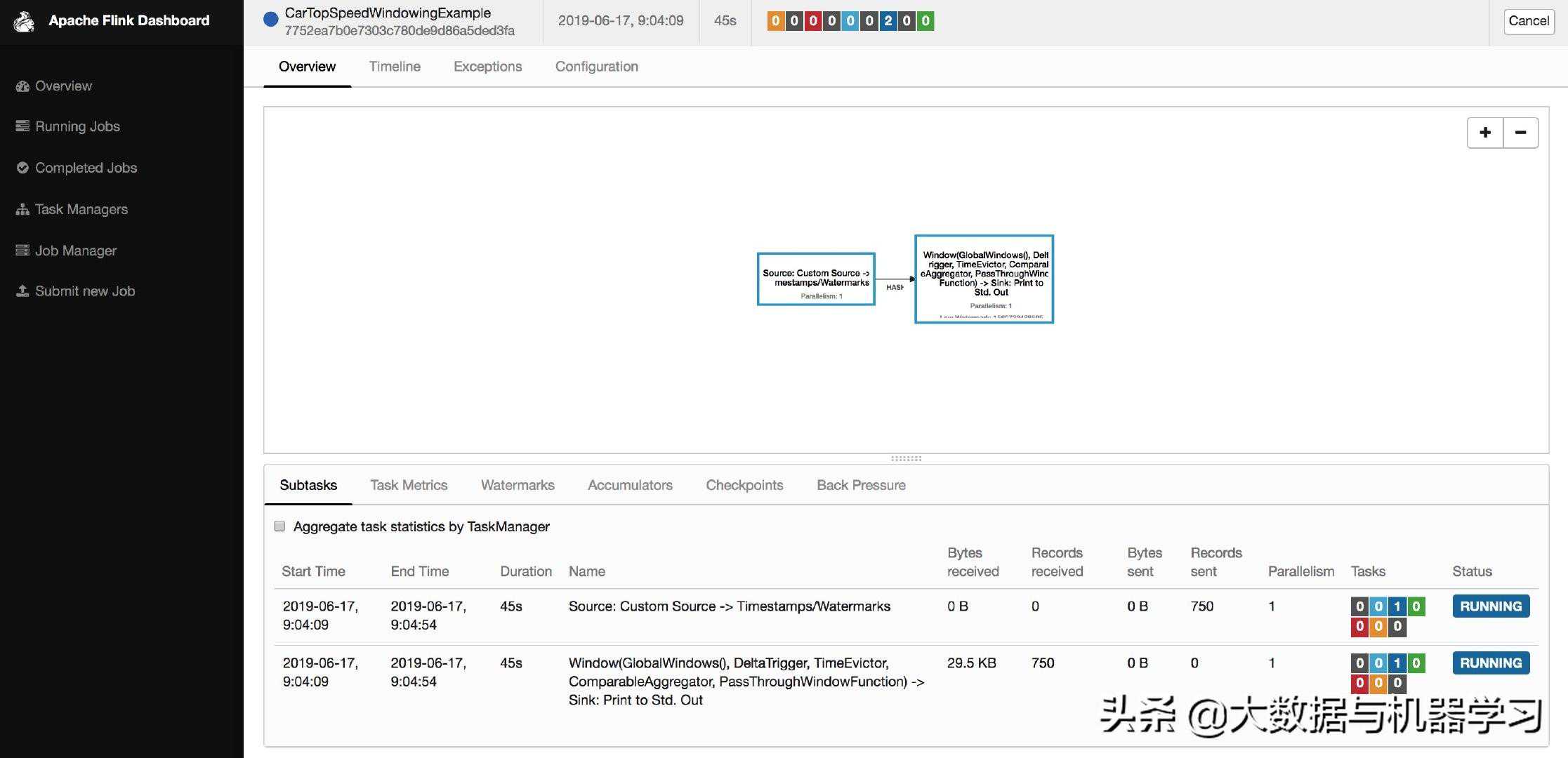
从页面上能看到TaskSlot变为了4,这时候任务的默认并发度是1。
通过Modify命令依次将并发度修改为4和3,可以看到每次Modify命令都会触发一次Savepoint。
/flinkmodify-p47752ea7b0e7303c780de9d86a5ded3fa
Modifyjob7752ea7b0e7303c780de9d86a5ded3fa.
/tmp/savepoint
total0
drwxr-xr-x3baoniu96Jun1709:05savepoint-7752ea-00c05b015836/
/flinkmodify-p37752ea7b0e7303c780de9d86a5ded3fa
Modifyjob7752ea7b0e7303c780de9d86a5ded3fa.
/tmp/savepoint
total0
drwxr-xr-x3baoniu96Jun1709:08savepoint-7752ea-449b131b2bd4/
查看JobManager的日志,可以看到:
2019-06-1709:05:11,179fafromsavepointfile:/tmp/savepoint/savepoint-790d7b-3581698f007e()
2019-06-1709:05:11,18280de9d86a5ded3fato3.
2019-06-1709:05:11,18252dfromlatestvalidcheckpoint:Checkpoint2@0for7752ea7b0e7303c780de9d86a5ded3fa.
2019-06-1709:05:11,184
2019-06-1709:05:11,184(7752ea7b0e7303c780de9d86a5ded3fa)switchedfromstateRUNNINGtoSUSPENDING.
:Jobisbeingrescaled.
Info
Info命令是用来查看Flink任务的执行计划(StreamGraph)的。
/flinkinfoexamples/streaming/
-----------------------ExecutionPlan-----------------------
{"nodes":[{"id":1,"type":"Source:CustomSource","pact":"DataSource","contents":"Source:CustomSource","parallelism":1},{"id":2,"type":"Timestamps/Watermarks","pact":"Operator","contents":"Timestamps/Watermarks","parallelism":1,"predecessors":[{"id":1,"ship_strategy":"FORWARD","side":"second"}]},{"id":4,"type":"Window(GlobalWindows(),DeltaTrigger,TimeEvictor,ComparableAggregator,PassThroughWindowFunction)","pact":"Operator","contents":"Window(GlobalWindows(),DeltaTrigger,TimeEvictor,ComparableAggregator,PassThroughWindowFunction)","parallelism":1,"predecessors":[{"id":2,"ship_strategy":"HASH","side":"second"}]},{"id":5,"type":"Sink:","pact":"DataSink","contents":"Sink:","parallelism":1,"predecessors":[{"id":4,"ship_strategy":"FORWARD","side":"second"}]}]}
--------------------------------------------------------------
拷贝输出的Json内容,粘贴到这个网站:
可以和实际运行的物理执行计划对比:
3.1.2Yarnper-job
单任务Attach模式
默认是Attach模式,即客户端会一直等待直到程序结束才会退出。
通过-myarn-cluster指定Yarn模式
Yarn上显示名字为Flinksessioncluster,这个Batch的Wordcount任务运行完会FINISHED。
客户端能看到结果输出
[admin@/home/admin/flink/]
$echo$HADOOP_CONF_DIR
/etc/hadoop/conf/
[admin@/home/admin/flink/]
$./bin/flinkrun-myarn-cluster./examples/batch/
2019-06-1709:15:24,511/11.163.188.29:8050
2019-06-1709:15:24,690
2019-06-1709:15:24,690
2019-06-1709:15:24,907:ClusterSpecification{masterMemoryMB=1024,taskManagerMemoryMB=1024,numberTaskManagers=1,slotsPerTaskManager=4}
2019-06-1709:15:25,430edbecauselibhadoopcannotbeloaded.
2019-06-1709:15:25,438('/Users/baoniu/Documents/work/tool/flink//conf')
2019-06-1709:15:36,239ation_47_0724
2019-06-1709:15:36,276_47_0724
2019-06-1709:15:36,276
2019-06-1709:15:36,281,currentstateACCEPTED
2019-06-1709:15:40,426cessfully.
Startingexecutionofprogram
ExecutingWordCountexamplewithdefaultinputdataset.
Use--inputtospecifyfileinput.
(a,5)
(action,1)
(after,1)
(against,1)
(all,2)
(would,2)
(wrong,1)
(you,1)
Programexecutionfinished
JobwithJobID8bfe7568cb5c3254af30cbbd9cd5971ehasfinished.
JobRuntime:9371ms
AccumulatorResults:
-2bed2c5506e9237fb85625416a1bc508()[170elements]
如果我们以Attach模式运行Streaming的任务,客户端会一直等待不退出,可以运行以下的例子试验下:
./bin/flinkrun-myarn-cluster./examples/streaming/
单任务Detached模式
由于是Detached模式,客户端提交完任务就退出了
Yarn上显示为Flinkper-jobcluster
$./bin/flinkrun-yd-myarn-cluster./examples/streaming/
2019-06-1809:21:59,247/11.163.188.29:8050
2019-06-1809:21:59,428
2019-06-1809:21:59,428
2019-06-1809:21:59,940:ClusterSpecification{masterMemoryMB=1024,taskManagerMemoryMB=1024,numberTaskManagers=1,slotsPerTaskManager=4}
2019-06-1809:22:00,427edbecauselibhadoopcannotbeloaded.
2019-06-1809:22:00,436('/Users/baoniu/Documents/work/tool/flink//conf')
^@2019-06-1809:22:12,113ation_47_0729
2019-06-1809:22:12,151_47_0729
2019-06-1809:22:12,151
2019-06-1809:22:12,155,currentstateACCEPTED
2019-06-1809:22:16,275cessfully.
2019-06-1809:22:16,275,usethefollowingcommandoraYARNwebinterfacetostopit:
yarnapplication-killapplication_47_0729
PleasealsonotethatthetemporaryfilesoftheYARNsessioninthehomedirectorywillnotberemoved.
JobhasbeensubmittedwithJobIDe61b9945c33c300906ad50a9a11f36df
3.1.3Yarnsession
启动Session
./bin/
表示启动一个Yarnsession集群,每个TM的内存是2G,每个TM有3个Slot。(注意:-n参数不生效)
/bin/
2019-06-1709:21:50,177:,localhost
2019-06-1709:21:50,179:,6123
2019-06-1709:21:50,179:,1024m
2019-06-1709:21:50,179:,1024m
2019-06-1709:21:50,179:,4
2019-06-1709:21:50,179:,file:///tmp/savepoint
2019-06-1709:21:50,180:,1
2019-06-1709:21:50,180:,8081
2019-06-1709:21:50,644musingbuiltin-javaclasseswhereapplicable
2019-06-1709:21:50,746(auth:SIMPLE)
2019-06-1709:21:50,848/11.163.188.29:8050
2019-06-1709:21:51,148:ClusterSpecification{masterMemoryMB=1024,taskManagerMemoryMB=2048,numberTaskManagers=1,slotsPerTaskManager=3}
2019-06-1709:21:51,588edbecauselibhadoopcannotbeloaded.
2019-06-1709:21:51,596('/Users/baoniu/Documents/work/tool/flink//conf')
^@2019-06-1709:22:03,304ation_47_0726
2019-06-1709:22:03,336_47_0726
2019-06-1709:22:03,336
2019-06-1709:22:03,340,currentstateACCEPTED
2019-06-1709:22:07,722cessfully.
2019-06-1709:22:08,050
:37109withleaderid0000-.
JobManagerWebInterface:
客户端默认是Attach模式,不会退出:
可以ctrl+c退出,然后再通过./bin/_47_0726连上来;
或者启动的时候用-d则为detached模式
Yarn上显示为Flinksessioncluster;
在本机的临时目录(有些机器是/tmp目录)下会生成一个文件:
/var/folders/2b/r6d49pcs23z43b8fqsyz885c0000gn/T/.yarn-properties-baoniu
MonJun1709:22:08CST2019
parallelism=3
dynamicPropertiesString=
applicationID=application_47_0726
提交任务
./bin/flinkrun./examples/batch/
将会根据/tmp/.yarn-properties-admin文件内容提交到了刚启动的Session。
/bin/flinkrun./examples/batch/
2019-06-1709:26:42,767/var/folders/2b/r6d49pcs23z43b8fqsyz885c0000gn/T/.yarn-properties-baoniu.
2019-06-1709:26:42,767/var/folders/2b/r6d49pcs23z43b8fqsyz885c0000gn/T/.yarn-properties-baoniu.
2019-06-1709:26:43,058
2019-06-1709:26:43,058
YARNpropertiessetdefaultparallelismto3
2019-06-1709:26:43,097/11.163.188.29:8050
2019-06-1709:26:43,229
2019-06-1709:26:43,229
2019-06-1709:26:43,327e''andport'37109'fromsuppliedapplicationid'application_47_0726'
Startingexecutionofprogram
ExecutingWordCountexamplewithdefaultinputdataset.
Use--inputtospecifyfileinput.
^@(a,5)
(action,1)
(after,1)
(against,1)
(all,2)
(and,12)
(wrong,1)
(you,1)
Programexecutionfinished
JobwithJobIDad9b0f1feed6d0bf6ba4e0f18b1e65efhasfinished.
JobRuntime:9152ms
AccumulatorResults:
-fd07c75d503d0d9a99e4f27dd153114c()[170elements]
运行结束后TM的资源会释放。
提交到指定的Session
通过-yid参数来提交到指定的Session。
$./bin/flinkrun-d-p30-myarn-cluster-yidapplication_47_0708./examples/streaming/
2019-03-2412:36:33,668/11.163.188.29:8050
2019-03-2412:36:33,773
2019-03-2412:36:33,773
2019-03-2412:36:33,837e''andport'60783'fromsuppliedapplicationid'application_47_0708'
Startingexecutionofprogram
ExecutingTopSpeedWindowingexamplewithdefaultinputdataset.
Use--inputtospecifyfileinput.
JobhasbeensubmittedwithJobID58d5049ebbf28d515159f2f88563f5fd
注:Blink版本的Session与Flink的Session的区别:
Flink的session-n参数不生效,而且不会提前启动TM;
Blink的session可以通过-n指定启动多少个TM,而且TM会提前起来;
3.2ScalaShell
官方文档:
3.2.1Deploy
Local
$bin/
StartingFlinkShell:
StartinglocalFlinkcluster(host:localhost,port:8081).
ConnectingtoFlinkcluster(host:localhost,port:8081).
scala
任务运行说明:
Batch任务内置了benv变量,通过print()将结果输出到控制台;
Streaming任务内置了senv变量,通过("jobname")来提交任务,且Datastream的输出只有在Local模式下打印到控制台;
Remote
先启动一个yarnsessioncluster:
$./bin/
2019-03-2509:52:16,341:,localhost
2019-03-2509:52:16,342:,6123
2019-03-2509:52:16,342:,1024m
2019-03-2509:52:16,343:,1024m
2019-03-2509:52:16,343:,4
2019-03-2509:52:16,343:,1
2019-03-2509:52:16,343:,file:///tmp/savepoint
2019-03-2509:52:16,343
…
:28665withleaderid0000-.
JobManagerWebInterface:
启动scalashell,连到jm:
$bin/
StartingFlinkShell:
ConnectingtoFlinkcluster(host:,port:28665).
scala
Yarn
$./bin/
StartingFlinkShell:
2019-03-2509:47:44,695:,localhost
2019-03-2509:47:44,697:,6123
2019-03-2509:47:44,697:,1024m
2019-03-2509:47:44,697:,1024m
2019-03-2509:47:44,697:,4
2019-03-2509:47:44,698:,1
2019-03-2509:47:44,698:,file:///tmp/savepoint
2019-03-2509:47:44,698:,8081
2019-03-2509:47:44,717/tmp/.yarn-properties-admin.
2019-03-2509:47:45,041/11.163.188.29:8050
2019-03-2509:47:45,098musingbuiltin-javaclasseswhereapplicable
2019-03-2509:47:45,266
2019-03-2509:47:45,275
2019-03-2509:47:45,357:ClusterSpecification{masterMemoryMB=1024,taskManagerMemoryMB=1024,numberTaskManagers=2,slotsPerTaskManager=2}
2019-03-2509:47:45,711edbecauselibhadoopcannotbeloaded.
2019-03-2509:47:45,718('/home/admin/flink//conf')
2019-03-2509:47:46,514ation_47_0710
2019-03-2509:47:46,534_47_0710
2019-03-2509:47:46,534
2019-03-2509:47:46,535,currentstateACCEPTED
2019-03-2509:47:51,051cessfully.
2019-03-2509:47:51,222
ConnectingtoFlinkcluster(host:10.10.10.10,port:56942).
按CTRL+C退出Shell后,这个Flinkcluster还会继续运行,不会退出。
3.2.2Execute
DataSet
/
/
StartingFlinkShell:
StartinglocalFlinkcluster(host:localhost,port:8081).
ConnectingtoFlinkcluster(host:localhost,port:8081).
scalavaltext=("Tobe,ornottobe,--thatisthequestion:--")
text:[String]=@5b407336
scalavalcounts={_.("\\W+")}.map{(_,1)}.groupBy(0).sum(1)
counts:[(String,Int)]=@6ee34fe4
()
(be,2)
(is,1)
(not,1)
(or,1)
(question,1)
(that,1)
(the,1)
(to,2)
对DataSet任务来说,print()会触发任务的执行。
也可以将结果输出到文件(先删除/tmp/out1,不然会报错同名文件已经存在),继续执行以下命令:
("/tmp/out1")
res1:[(String,Int)]=DataSink'unnamed'(TextOutputFormat(/tmp/out1)-UTF-8)
("batchtest")
res2:=@737652a9
查看/tmp/out1文件就能看到输出结果。
/tmp/out1
(be,2)
(is,1)
(not,1)
(or,1)
(question,1)
(that,1)
(the,1)
(to,2)
DataSteam
scalavaltextStreaming=("Tobe,ornottobe,--thatisthequestion:--")
textStreaming:[String]=@4970b93d
scalavalcountsStreaming={_.("\\W+")}.map{(_,1)}.keyBy(0).sum(1)
countsStreaming:[(String,Int)]=@6a478680
()
res3:[(String,Int)]=@42bfc11f
("StreamingWordcount")
(to,1)
(be,1)
(or,1)
(not,1)
(to,2)
(be,2)
(that,1)
(is,1)
(the,1)
(question,1)
res4:=@1878815a
对DataStream任务,print()并不会触发任务的执行,需要显示调用execute(“jobname”)才会执行任务。
TableAPI
在Blink开源版本里面,支持了TableAPI方式提交任务(可以用提交SQL查询),社区版本会支持TableAPI:
3.3SQLClientBeta
SQLClient目前还只是测试版,处于开发阶段,只能用于SQL的原型验证,不推荐在生产环境使用。
3.3.1基本用法
/
Startingcluster.
/bin/
Nodefaultenvironmentspecified.
Searchingfor'/Users/baoniu/Documents/work/tool/flink//conf/'found.
Readingdefaultenvironmentfrom:file:/Users/baoniu/Documents/work/tool/flink//conf/
Nosessionenvironmentspecified.
Validatingcurrentenvironmentdone.
……
FlinkSQLhelp;
Thefollowingcommandsareavailable:
QUITQuitstheSQLCLIclient.
CLEARClearsthecurrentterminal.
HELPPrintstheavailablecommands.
SHOWTABLESShowsallregisteredtables.
SHOWFUNCTIONSShowsallregistereduser-definedfunctions.
DESCRIBEDescribestheschemaofatablewiththegivenname.
EXPLAINDescribestheexecutionplanofaqueryortablewiththegivenname.
SELECTExecutesaSQLSELECTqueryontheFlinkcluster.
INSERTINTOInsertstheresultsofaSQLSELECTqueryintoadeclaredtablesink.
:'CREATEVIEWnameASquery;'
:'DROPVIEWname;'
SOURCEReadsaSQLSELECTqueryfromafileandexecutesitontheFlinkcluster.
:'SETkey=value;'.Use'SET;'forlistingallproperties.
RESETResetsallsessionconfigurationproperties.
Hint:Makesurethatastatementswith';'forfinalizing(multi-line)statements.
Select查询
FlinkSQLSELECT'HelloWorld';
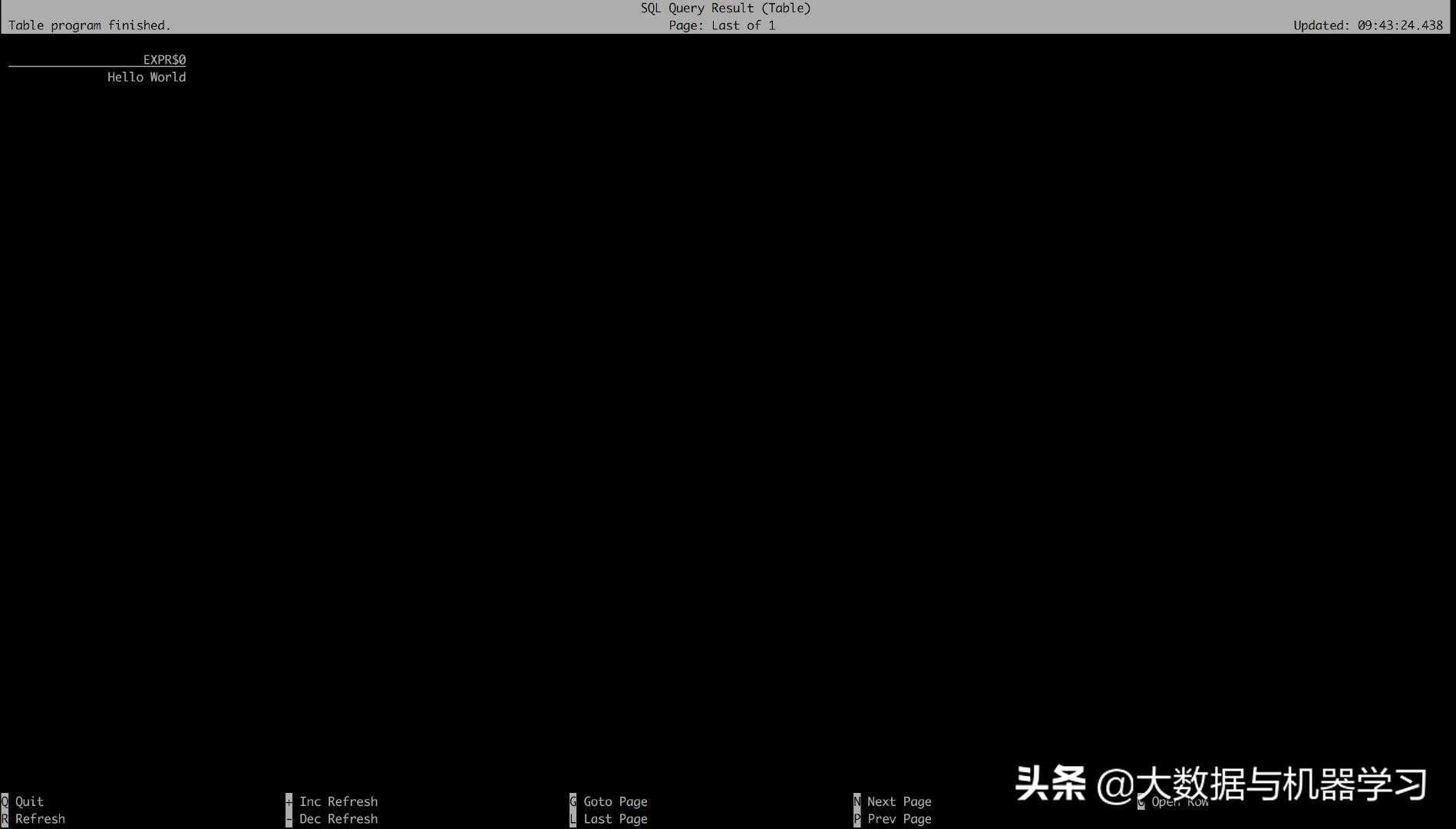
按”Q”退出这个界面
打开。这个查询采用的是读取固定数据集的CustomSource,输出用的是StreamCollectSink,且只输出一条结果。
注意:如果本机的临时目录存在类似.yarn-properties-baoniu的文件,任务会提交到Yarn上。
Explain
Explain命令可以查看SQL的执行计划。
FlinkSQLexplainSELECTname,COUNT(*)AScntFROM(VALUES('Bob'),('Alice'),('Greg'),('Bob'))ASNameTable(name)GROUPBYname;
==AbstractSyntaxTree==//抽象语法树
LogicalAggregate(group=[{0}],cnt=[COUNT()])
LogicalValues(tuples=[[{_UTF-16LE'Bob'},{_UTF-16LE'Alice'},{_UTF-16LE'Greg'},{_UTF-16LE'Bob'}]])
==OptimizedLogicalPlan==//优化后的逻辑执行计划
DataStreamGroupAggregate(groupBy=[name],select=[name,COUNT(*)AScnt])
DataStreamValues(tuples=[[{_UTF-16LE'Bob'},{_UTF-16LE'Alice'},{_UTF-16LE'Greg'},{_UTF-16LE'Bob'}]])
==PhysicalExecutionPlan==//物理执行计划
Stage3:DataSource
content:collectelementswithCollectionInputFormat
Stage5:Operator
content:groupBy:(name),select:(name,COUNT(*)AScnt)
ship_strategy:HASH
3.3.2结果展示
SQLClient支持两种模式来维护并展示查询结果:
tablemode:在内存中物化查询结果,并以分页table形式展示。用户可以通过以下命令启用tablemode;
=table
changlogmode:不会物化查询结果,而是直接对continuousquery产生的添加和撤回(retractions)结果进行展示。
=changelog
接下来通过实际的例子进行演示。
Tablemode
=table;
[INFO]Sessionpropertyhasbeenset.
FlinkSQLSELECTname,COUNT(*)AScntFROM(VALUES('Bob'),('Alice'),('Greg'),('Bob'))ASNameTable(name)GROUPBYname;
运行结果如下图所示:
Changlogmode
=changelog;
[INFO]Sessionpropertyhasbeenset.
FlinkSQLSELECTname,COUNT(*)AScntFROM(VALUES('Bob'),('Alice'),('Greg'),('Bob'))ASNameTable(name)GROUPBYname;
运行结果如下图所示:
其中‘-’代表的就是撤回消息。
3.3.3EnvironmentFiles
目前的SQLClient还不支持DDL语句,只能通过yaml文件的方式来定义SQL查询需要的表,UDF和运行参数等信息。
首先,准备和两个文件。
/tmp/
tables:
-name:MyTableSource
type:source-table
update-mode:app
connector:
type:filesystem
path:"/tmp/"
format:
type:csv
fields:
-name:MyField1
type:INT
-name:MyField2
type:VARCHAR
line-delimiter:"\n"
comment-prefix:"Executionpropertiesallowforchangingthebehaviorofatableprogram.
execution:
type:streamingrequired:either'table'or'changelog'
max-table-result-rows:1000000'table'mode(1000000bydefault,smaller1meansunlimited)
time-characteristic:event-timeoptional:Flink'sparallelism(1bydefault)
periodic-watermarks-interval:200optional:Flink'smaximumparallelism(128bydefault)
min-idle-state-retention:0optional:tableprogram'smaximumidlestatetime
restart-strategy:"fallback"toglobalrestartstrategybydefault
#Deploymentpropertiesallowfordescribingtheclustertowhichtableprogramsaresubmittedto.
deployment:
response-timeout:5000
/tmp/
1,hello
2,world
3,helloworld
1,ok
3,byebye
4,yes
启动SQLClient:
/bin//tmp/
Nodefaultenvironmentspecified.
Searchingfor'/Users/baoniu/Documents/work/tool/flink//conf/'found.
Readingdefaultenvironmentfrom:file:/Users/baoniu/Documents/work/tool/flink//conf/
Readingsessionenvironmentfrom:file:/tmp/
Validatingcurrentenvironmentdone.
FlinkSQLshowtables;
MyCustomView
MyTableSink
MyTableSource
FlinkSQLdescribeMyTableSource;
root
|--MyField1:Integer
|--MyField2:String
FlinkSQLdescribeMyCustomView;
root
|--MyField2:String
FlinkSQLcreateviewMyView1asselectMyField1fromMyTableSource;
[INFO]Viewhasbeencreated.
FlinkSQLshowtables;
MyCustomView
MyTableSource
MyView1
FlinkSQLdescribeMyView1;
root
|--MyField1:Integer
FlinkSQLselect*fromMyTableSource;
使用insertinto写入结果表:
FlinkSQLinsertintoMyTableSinkselect*fromMyTableSource;
[INFO]SubmittingSQLupdatestatementtothecluster
[INFO]Tableupdatestatementhasbeensuccessfullysubmittedtothecluster:
ClusterID:StandaloneClusterId
JobID:3fac2be1fd891e3e07595c684bb7b7a0
Webinterface:http://localhost:8081
查询生成的结果数据文件:
/tmp/
1,hello
2,world
3,helloworld
1,ok
3,byebye
4,yes
也可以在Environment文件里面定义UDF,在SQLClient里面通过「HOWFUNCTIONS」查询和使用,这里就不再说明了。
SQLClient功能社区还在开发中,详见FLIP-24。
3.4RestfulAPI
接下来我们演示如何通过RestAPI来提交Jar包和执行任务。
更详细的操作请参考Flink的RestfulAPI文档:
{"taskmanagers":1,"slots-total":4,"slots-available":0,"jobs-running":3,"jobs-finished":0,"jobs-cancelled":0,"jobs-failed":0,"flink-version":"1.7.2","flink-commit":"ceba8af"}%
"Expect:"-F"jarfile=@/Users/baoniu/Documents/work/tool/flink//examples/streaming/"
{"filename":"/var/folders/2b/r6d49pcs23z43b8fqsyz885c0000gn/T/flink-web-124c4895-cf08-4eec-8e15-8263d347efc2/flink-web-upload/6077eca7-6db0-4570-a4d0-4c3e05a5dc59_","status":"success"}%
{"address":"http://localhost:8081","files":[{"id":"6077eca7-6db0-4570-a4d0-4c3e05a5dc59_","name":"","uploaded":00,"entry":[{"name":"","description":null}]}]}%
{"plan":{"jid":"41029eb3feb9132619e454ec9b2a89fb","name":"CarTopSpeedWindowingExample","nodes":[{"id":"90bea66de1c231edf33913ecd54406c1","parallelism":1,"operator":"","operator_strategy":"","description":"Window(GlobalWindows(),DeltaTrigger,TimeEvictor,ComparableAggregator,PassThroughWindowFunction)-Sink:","inputs":[{"num":0,"id":"cbc357ccb763df2852fee8c4fc7d55f2","ship_strategy":"HASH","exchange":"pipelined_bounded"}],"optimizer_properties":{}},{"id":"cbc357ccb763df2852fee8c4fc7d55f2","parallelism":1,"operator":"","operator_strategy":"","description":"Source:CustomSource-Timestamps/Watermarks","optimizer_properties":{}}]}}%
{"jobid":"04d80a24b076523d3dc5fbaa0ad5e1ad"}%
RestfulAPI还提供了很多监控和Metrics相关的功能,对于任务提交的操作也支持的比较全面。
3.5Web
在FlinkDashboard页面左侧可以看到有个「SubmitnewJob」的地方,用户可以上传Jar包和显示执行计划和提交任务。Web提交功能主要用于新手入门和演示用。
4.结束
本期的课程到这里就结束了,我们主要讲解了Flink的5种任务提交的方式。熟练掌握各种任务提交方式,有利于提高我们日常的开发和运维效率。